








Google Dialogflow Plugin
1. Overview
This guide describes how to configure and use the Google Dialogflow (GDF) plugin to the UniMRCP server. The document is intended for users having a certain knowledge of Google Dialogflow and UniMRCP.
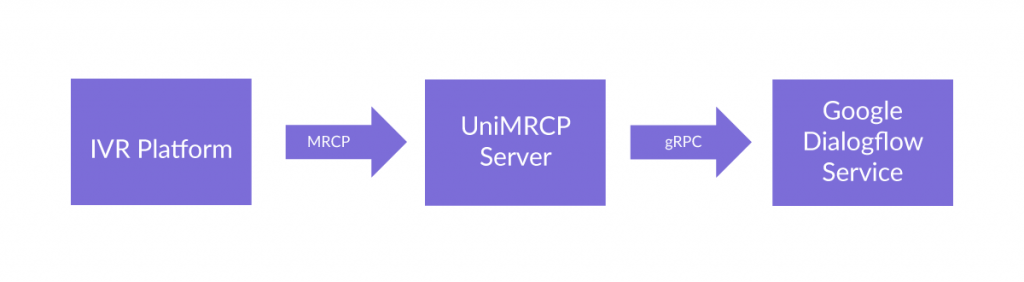
1.1 Installation
For installation instructions, use one of the guides below.
- RPM Package Installation (Red Hat / Cent OS)
- Deb Package Installation (Debian / Ubuntu)
1.2 Applicable Versions
Instructions provided in this guide are applicable to the following versions.
- UniMRCP 1.5.0 and above
- UniMRCP GDF Plugin 1.0.0 and above
2. Supported Features
This is a brief check list of the features currently supported by the UniMRCP server running with the GDF plugin.
2.1 MRCP Methods
- DEFINE-GRAMMAR
- RECOGNIZE
- START-INPUT-TIMERS
- STOP
- SET-PARAMS
- GET-PARAMS
2.2 MRCP Events
- RECOGNITION-COMPLETE
- START-OF-INPUT
2.3 MRCP Header Fields
- Input-Type
- No-Input-Timeout
- Recognition-Timeout
- Speech-Complete-Timeout
- Speech-Incomplete-Timeout
- Waveform-URI
- Media-Type
- Completion-Cause
- Confidence-Threshold
- Start-Input-Timers
- DTMF-Interdigit-Timeout
- DTMF-Term-Timeout
- DTMF-Term-Char
- Save-Waveform
- Speech-Language
- Cancel-If-Queue
- Sensitivity-Level
2.4 Grammars
- Built-in speech, event and DTMF grammars
- SRGS XML (limited support)
2.5 Results
- NLSML
- JSON
3. Configuration Format
The configuration file of the GDF plugin is located in /opt/unimrcp/conf/umsgdf.xml. The configuration file is written in XML.
3.1 Document
The root element of the XML document must be <umsgdf>.
Attributes
| Name | Unit | Description |
| license-file | File path | Specifies the license file. File name may include patterns containing ‘*’ sign. If multiple files match the pattern, the most recent one gets used. |
| gapp-credentials-file | File path | Specifies the Google Application Credentials file to use. File name may include patterns containing ‘*’ sign. If multiple files match the pattern, the most recent one gets used. |
Parent
None.
Children
| Name | Unit | Description |
| <streaming-recognition> | String | Specifies parameters of streaming recognition employed via gRPC. |
| <results> | String | Specifies parameters of recognition results set in RECOGNITION-COMPLETE events. |
| <builtin-grammars> | String | Contains a list of built-in grammars. |
| <speech-contexts> | String | Contains a list of speech contexts. |
| <speech-dtmf-input-detector> | String | Specifies parameters of the speech and DTMF input detector. |
| <utterance-manager> | String | Specifies parameters of the utterance manager. |
| <rdr-manager> | String | Specifies parameters of the Recognition Details Record (RDR) manager. |
| <monitoring-agent> | String | Specifies parameters of the monitoring manager. |
| <license-server> | String | Specifies parameters used to connect to the license server. The use of the license server is optional. |
Example
This is an example of a bare document.
< umsgdf license-file="umsgdf_*.lic" gapp-credentials-file="*.json"> </ umsgdf> |
3.2 Streaming Recognition
This element specifies parameters of streaming recognition.
Attributes
| Name | Unit | Description |
| language | String | Specifies the default language to use, if not set by the client. For a list of supported languages, visit https://cloud.google.com/speech/docs/languages |
| single-utterance | Boolean | Specifies whether to detect a single spoken utterance or perform continuous recognition. Available since GDF 1.13.0. |
| interim-results | Boolean | Specifies whether to request interim results or not. |
| start-of-input | String | Specifies the source of start of input event sent to the client (use “service-originated” for an event originated based on a first-received interim result and “internal” for an event determined by plugin). Available since GDF 1.4.0. |
| max-alternatives | Integer | Specifies the maximum number of speech recognition result alternatives to be returned. Can be overridden by client by means of the header field N-Best-List-Length. |
| project-id | String | Specifies a project ID associated to the corresponding Dialogflow agent. |
| skip-unsupported-grammars | Boolean | Specifies whether to skip or raise an error while referencing a malformed or not supported grammar. Available since GDF 1.5.0. |
| skip-empty-results | Boolean | Specifies whether to implicitly initiate a new gRPC request if the current one completes with an empty result. Available since GDF 1.14.0. |
| transcription-grammar | String | Specifies the name of the built-in speech transcription grammar. The grammar can be referenced as builtin:speech/transcribe or builtin:grammar/transcribe, where transcribe is the default value of this parameter. Available since GDF 1.5.0. |
| generate-output-audio | Boolean | Specifies whether to enable generation of output audio. Available since GDF 1.12.0. |
| word-info | Boolean | Specifies whether to return word-level time offset information. Can be overridden by client. Available since GDF 1.15.0. |
| model | String | Specifies the domain-specific model, if used. Can be overridden by client. Available since GDF 1.15.0. |
| model-variant | String | Specifies the variant of the specified speech model, if used. Can be overridden by client. Available since GDF 1.15.0. |
| environment | String | Specifies the custom environment, if used. Can be overridden by client. Available since GDF 1.15.0. |
| http-proxy | String | Specifies the URI of HTTP proxy, if used. Available since GDF 1.10.0. |
| stream-creation-timeout | Time interval [msec] | Specifies how long to wait for gRPC stream creation. If timeout is set 0, no timer is used. Otherwise, if timeout is elapsed, gRPC stream creation is cancelled. Available since GDF 1.14.0. |
| inter-result-timeout | Time interval |
[msec]
Specifies a timeout between interim results containing transcribed speech. If the timeout is elapsed, input is considered complete. The timeout is specified in msec and defaults to 0 (disabled). Available since GDF 1.15.0.
grpc-log-redirection
Boolean
Specifies whether to enable gRPC log redirection. Available since GDF 1.14.0.
grpc-log-verbosity
String
Specifies gRPC logging verbosity. One of DEBUG, INFO, ERROR. See GRPC_VERBOSITY for more info. Available since GDF 1.14.0.
grpc-log-trace
String
Specifies a comma separated list of tracers producing gRPC logs. Use ‘all’ to turn all tracers on. See GRPC_TRACE for more info. Available since GDF 1.14.0.
Parent
<umsgdf>
Children
None.
Example
This is an example of streaming recognition element.
| <streaming-recognition single-utterance=”true” interim-results=”true” start-of-input=”service-originated” language=”en-US” max-alternatives=”1″ project-id=”” skip-unsupported-grammars=”true” transcription-grammar=”transcribe” /> |
3.3 Results
This element specifies parameters of recognition results set in RECOGNITION-COMPLETE events.
Availability
>= GDF 1.1.0.
Attributes
| Name | Unit | Description |
| format | String | Specifies the format of results to be returned to the client (use “standard” for NLSML and “json” for JSON). |
| indent | Integer | Specifies the indent to use while composing the results. |
| replace-dots | Boolean | Specifies whether to replace ‘.’ with ‘_’ in the parameter names, used while composing an XML content. The parameter is observed only if the format is set to standard. |
| replace-dashes | Boolean | Specifies whether to replace ‘-‘ with ‘_’ in the parameter names, used while composing an XML content. The parameter is observed only if the format is set to standard. Available since GDF 1.15.0. |
| confidence-format | String | Specifies the format of the confidence score to be returned. The parameter is observed only if the format is set to standard. Use one of: auto for a format based on protocol version, mrcpv2 for a float value in the range of 0..1, mrcpv1 for an integer value in the range of 0..100 Available since GDF 1.7.0. |
| tag-format | String | Specifies the format of the instance element to be returned. The parameter is observed only if the format is set to standard. Use one of: semantics/xml for query result represented in XML [default]semantics/json for query result represented in JSONswi-semantics/xml for query result set in an inner <SWI_meaning> element represented in XMLswi-semantics/json for query result set in an inner <SWI_meaning> element represented in JSON Available since GDF 1.9.0. |
Parent
<umsgdf>
Children
None.
Example
This is an example of results element.
| <results format=”standard” indent=”0″ replace-dots=”true” confidence-format=”auto” tag-format=”semantics/xml” /> |
3.4 Built-in Grammars
This element specifies a list of built-in grammars.
Availability
>= GDF 1.1.0.
Attributes
None.
Parent
<umsgdf>
Children
<builtin-grammar>
Example
The example below defines built-in boolean speech and DTMF grammars.
| <builtin-grammars> <builtin-grammar mode=”speech” name=”boolean” action=”builtin.boolean” parameter-name=”option” project-id=””/> <builtin-grammar mode=”dtmf” name=”boolean” action=”builtin.boolean” parameter-name=”option” project-id=”” length=”1″ input=”event”/> </builtin-grammars> |
3.5 Built-in Grammar
This element specifies a built-in grammar.
Availability
>= GDF 1.1.0.
Attributes
| Name | Unit | Description |
| enable | Boolean | Specifies whether the speech context is enabled or disabled. |
| mode | String | Specifies the mode of the grammar: either “speech” or “dtmf”. |
| name | String | Specifies the name of the grammar being referenced in MRCP requests. |
| action | String | Specifies the action name to be triggered by Dialogflow. |
| parameter-name | String | Specifies the parameter name to be set by Dialogflow. |
| project-id | String | Specifies an optional project ID associated to the corresponding Dialogflow agent. If not specified, the default one is used. |
Parent
<builtin-grammars>
Children
None.
Example
This is an example of built-in Boolean speech grammar.
| <builtin-grammar enable=”false” mode=”speech” name=”boolean” action=”builtin.boolean” parameter-name=”option” project-id=””/> |
3.6 Speech Contexts
This element specifies a list of speech contexts.
Attributes
None.
Parent
<umsgdf>
Children
<speech-context>
Example
The example below defines a speech context booking.
| <speech-contexts> <speech-context id=”booking” enable=”true”> <phrase>I would like to book a flight from New York to Rome with a ticket eligible for free cancellation</phrase> <phrase>I would like to book a one-way flight from New York to Rome</phrase> </speech-context> </speech-contexts> |
3.7 Speech Context
This element specifies a speech context.
Attributes
| Name | Unit | Description |
| id | String | Specifies a unique string identifier of the speech context to be referenced by the MRCP client. |
| enable | Boolean | Specifies whether the speech context is enabled or disabled. |
| speech-complete | Boolean | Specifies whether to complete input as soon as an interim result matches one of the specified phrases. Available since GDF 1.6.0. |
| language | String | The language the phrases are defined for. Available since GDF 1.8.0. |
Parent
<speech-contexts>
Children
<phrase>
Example
This is an example of speech context element.
| <speech-context id=”booking” enable=”true”> <phrase>I would like to book a flight from New York to Rome with a ticket eligible for free cancellation</phrase> <phrase>I would like to book a one-way flight from New York to Rome</phrase> </speech-context> |
3.8 Phrase
This element specifies a phrase in the speech context.
Attributes
| Name | Unit | Description |
| weight (or boost) | Float | Specifies a positive value between 0 and 20. The value increases the probability that a specific phrase is recognized over other similar sounding phrases. |
Parent
<speech-context>
Children
None.
3.9 Speech and DTMF Input Detector
This element specifies parameters of the speech and DTMF input detector.
Attributes
| Name | Unit | Description |
| vad-mode | Integer | Specifies an operating mode of VAD in the range of [0 … 3]. Default is 1. |
| speech-start-timeout | Time interval [msec] | Specifies how long to wait in transition mode before triggering a start of speech input event. |
| speech-complete-timeout | Time interval |
[msec]
Specifies how long to wait in transition mode before triggering an end of speech input event. The complete timeout is used when there is an interim result available.
speech-incomplete-timeout
Time interval [msec]
Specifies how long to wait in transition mode before triggering an end of speech input event. The incomplete timeout is used as long as there is no interim result available. Afterwards, the complete timeout is used. Available since GDF 1.2.0.
noinput-timeout
Time interval
[msec]
Specifies how long to wait before triggering a no-input event.
input-timeout
Time interval [msec]
Specifies how long to wait for input to complete.
dtmf-interdigit-timeout
Time interval
[msec]
Specifies a DTMF inter-digit timeout.
dtmf-term-timeout
Time interval [msec]
Specifies a DTMF input termination timeout.
dtmf-term-char
Character
Specifies a DTMF input termination character.
speech-leading-silence
Time interval [msec]
Specifies desired silence interval preceding spoken input.
speech-trailing-silence
Time interval
[msec]
Specifies desired silence interval following spoken input.
speech-output-period
Time interval [msec]
Specifies an interval used to send speech frames to the recognizer.
Parent
<umsgdf>
Children
None.
Example
The example below defines a typical speech and DTMF input detector having the default parameters set.
| <speech-dtmf-input-detector vad-mode=”2″ speech-start-timeout=”300″ speech-complete-timeout=”1000″ speech-incomplete-timeout=”3000″ noinput-timeout=”5000″ input-timeout=”10000″ dtmf-interdigit-timeout=”5000″ dtmf-term-timeout=”10000″ dtmf-term-char=”” speech-leading-silence=”300″ speech-trailing-silence=”300″ speech-output-period=”200″ /> |
3.10 Utterance Manager
This element specifies parameters of the utterance manager.
Attributes
| Name | Unit | Description |
| save-waveforms | Boolean | Specifies whether to save waveforms or not. |
| purge-existing | Boolean | Specifies whether to delete existing records on start-up. |
| max-file-age | Time interval |
[min]
Specifies a time interval in minutes after expiration of which a waveform is deleted. Set 0 for infinite.
max-file-count
Integer
Specifies the max number of waveforms to store. If reached, the oldest waveform is deleted. Set 0 for infinite.
waveform-base-uri
String
Specifies the base URI used to compose an absolute waveform URI.
waveform-folder
Dir path
Specifies a folder the waveforms should be stored in.
file-prefix
String
Specifies a prefix used to compose the name of the file to be stored. Defaults to ‘umsgdf-‘, if not specified.
use-logging-tag
Boolean
Specifies whether to use the MRCP header field Logging-Tag, if present, to compose the name of the file to be stored. Available since GDF 1.14.0.
Parent
<umsgdf>
Children
None.
Example
The example below defines a typical utterance manager having the default parameters set.
| <utterance-manager save-waveforms=”false” purge-existing=”false” max-file-age=”60″ max-file-count=”100″ waveform-base-uri=”http://localhost/utterances/” waveform-folder=”” /> |
3.11 RDR Manager
This element specifies parameters of the Recognition Details Record (RDR) manager.
Attributes
| Name | Unit | Description |
| save-records | Boolean | Specifies whether to save recognition details records or not. |
| purge-existing | Boolean | Specifies whether to delete existing records on start-up. |
| max-file-age | Time interval |
[min]
Specifies a time interval in minutes after expiration of which a record is deleted. Set 0 for infinite.
max-file-count
Integer
Specifies the max number of records to store. If reached, the oldest record is deleted. Set 0 for infinite.
record-folder
Dir path
Specifies a folder to store recognition details records in. Defaults to ${UniMRCPInstallDir}/var.
file-prefix
String
Specifies a prefix used to compose the name of the file to be stored. Defaults to ‘umsgdf-‘, if not specified.
use-logging-tag
Boolean
Specifies whether to use the MRCP header field Logging-Tag, if present, to compose the name of the file to be stored. Available since GDF 1.14.0.
Parent
<umsgdf>
Children
None.
Example
The example below defines a typical utterance manager having the default parameters set.
| <rdr-manager save-records=”false” purge-existing=”false” max-file-age=”60″ max-file-count=”100″ waveform-folder=”” /> |
3.12 Monitoring Agent
This element specifies parameters of the monitoring agent.
Attributes
| Name | Unit | Description |
| refresh-period | Time interval |
[sec]
Specifies a time interval in seconds used to periodically refresh usage details. See <usage-refresh-handler>.
Parent
<umsgdf>
Children
<usage-change-handler>
<usage-refresh-handler>
Example
The example below defines a monitoring agent with usage change and refresh handlers.
| <monitoring-agent refresh-period=”60″> <usage-change-handler> <log-usage enable=”true” priority=”NOTICE”/> </usage-change-handler> <usage-refresh-handler> <dump-channels enable=”true” status-file=”umsgdf-channels.status”/> </usage-refresh-handler > </monitoring-agent> |
3.13 Usage Change Handler
This element specifies an event handler called on every usage change.
Attributes
None.
Parent
<monitoring-agent>
Children
<log-usage>
<update-usage>
<dump-channels>
Example
This is an example of the usage change event handler.
| <usage-change-handler> <log-usage enable=”true” priority=”NOTICE”/> <update-usage enable=”false” status-file=”umsgdf-usage.status”/> <dump-channels enable=”false” status-file=”umsgdf-channels.status”/> </usage-change-handler> |
3.14 Usage Refresh Handler
This element specifies an event handler called periodically to update usage details.
Attributes
None.
Parent
<monitoring-agent>
Children
<log-usage>
<update-usage>
<dump-channels>
Example
This is an example of the usage change event handler.
| <usage-refresh-handler> <log-usage enable=”true” priority=”NOTICE”/> <update-usage enable=”false” status-file=”umsgdf-usage.status”/> <dump-channels enable=”false” status-file=”umsgdf-channels.status”/> </usage-refresh-handler> |
3.15 License Server
This element specifies parameters used to connect to the license server.
Attributes
| Name | Unit | Description |
| enable | Boolean | Specifies whether the use of license server is enabled or not. If enabled, the license-file attribute is not honored. |
| server-address | String | Specifies the IP address or host name of the license server. |
| certificate-file | File path | Specifies the client certificate used to connect to the license server. File name may include patterns containing a ‘*’ sign. If multiple files match the pattern, the most recent one gets used. |
| ca-file | File path | Specifies the certificate authority used to validate the license server. |
| channel-count | Integer | Specifies the number of channels to check out from the license server. If not specified or set to 0, either all available channels or a pool of channels will be checked based on the configuration of the license server. |
Parent
<umsgdf>
Children
None.
Example
The example below defines a typical configuration which can be used to connect to a license server located, for example, at 10.0.0.1.
| <license-server enable=”true” server-address=”10.0.0.1″ certificate-file=”unilic_client_*.crt” ca-file=”unilic_ca.crt” /> |
For further reference to the license server, visit
4. Configuration Steps
This section outlines common configuration steps.
4.1 Using Default Configuration
The default configuration should be sufficient for the general use.
4.2 Specifying Dialogflow Agent
A Dialogflow agent is associated by the corresponding Google Project ID.
The Project ID is specified in the configuration file umsgdf.xml by the parameter project-id in the element <streaming-recognition>. For example:
| <streaming-recognition interim-results=”true” start-of-input=”service-originated” language=”en-US” max-alternatives=”1″ project-id=“abcdefgh-ijklmn-123456” /> |
The Project ID can also be specified per individual MRCP RECOGNIZE request as a query input attribute to the built-in speech grammar. For example:
| builtin:speech/transcribe?projectid=abcdefgh-ijklmn-123456 |
Since GDF 1.7.0 release, the Project ID can also be specified per individual MRCP RECOGNIZE request via the header field Vendor-Specific-Parameters. For example:
| Vendor-Specific-Parameters: projectid=abcdefgh-ijklmn-123456 |
Since GDF 1.8.0 release, the Project ID can also be specified in SRGS XML grammar by means of predefined metadata. For example:
| <grammar mode=”voice” root=”transcribe” version=”1.0″ xml:lang=”en-US” xmlns=”http://www.w3.org/2001/06/grammar”> <meta name=”scope” content=”builtin”/> <meta name=”projectid” content=”abcdefgh-ijklmn-123456″/> <rule id=”main”> <one-of/ > </rule> </grammar> |
4.3 Specifying Recognition Language
Recognition language can be specified by the client per MRCP session by means of the header field Speech-Language set in a SET-PARAMS or RECOGNIZE request. Otherwise, the parameter language set in the configuration file umsgdf.xml is used. The parameter defaults to en-US.
For supported languages and their corresponding codes, visit the following link.
Since GDF 1.8.0, the recognition language can also be set by the attribute xml:lang specified in the SRGS grammar.
| <?xml version=”1.0″ encoding=”UTF-8″?> <grammar mode=”voice” root=”transcribe” version=”1.0″ xml:lang=”en-AU” xmlns=”http://www.w3.org/2001/06/grammar”> <meta name=”scope” content=”builtin”/> <rule id=”transcribe”><one-of/></rule> </grammar> |
4.4 Specifying Sampling Rate
Sampling rate is determined based on the SDP negotiation. Refer to the configuration guide of the UniMRCP server on how to specify supported encodings and sampling rates to be used in communication between the client and server.
The native sampling rate with the linear16 audio encoding is used in gRPC streaming to the Google Dialogflow service.
4.5 Specifying Speech Input Parameters
While the default parameters specified for the speech input detector are sufficient for the general use, various parameters can be adjusted to better suit a particular requirement.
- speech-start-timeout
This parameter is used to trigger a start of speech input. The shorter is the timeout, the sooner a START-OF-INPUT event is delivered to the client. However, a short timeout may also lead to a false positive.
- speech-complete-timeout
This parameter is used to trigger an end of speech input. The shorter is the timeout, the shorter is the response time. However, a short timeout may also lead to a false positive.
Note that both events, an expiration of the speech complete timeout and an END-OF-SINGLE-UTTERANCE response delivered from the Google Dialogflow service, are monitored to trigger an end of speech input, on whichever comes first basis. In order to rely solely on an event delivered from the speech service, the parameter speech-complete-timeout needs to be set to a higher value.
- vad-mode
This parameter is used to specify an operating mode of the Voice Activity Detector (VAD) within an integer range of [0 … 3]. A higher mode is more aggressive and, as a result, is more restrictive in reporting speech. The parameter can be overridden per MRCP session by setting the header field Sensitivity-Level in a SET-PARAMS or RECOGNIZE request. The following table shows how the Sensitivity-Level is mapped to the vad-mode.
| Sensitivity-Level | Vad-Mode |
| [0.00 … 0.25) | 0 |
| [0.25 … 0.50) | 1 |
| [0.50 … 0.75) | 2 |
| [0.75 … 1.00] | 3 |
4.6 Specifying DTMF Input Parameters
While the default parameters specified for the DTMF input detector are sufficient for the general use, various parameters can be adjusted to better suit a particular requirement.
- dtmf-interdigit-timeout
This parameter is used to set an inter-digit timeout on DTMF input. The parameter can be overridden per MRCP session by setting the header field DTMF-Interdigit-Timeout in a SET-PARAMS or RECOGNIZE request.
- dtmf-term-timeout
This parameter is used to set a termination timeout on DTMF input and is in effect when dtmf-term-char is set and there is a match for an input grammar. The parameter can be overridden per MRCP session by setting the header field DTMF-Term-Timeout in a SET-PARAMS or RECOGNIZE request.
- dtmf-term-char
This parameter is used to set a character terminating DTMF input. The parameter can be overridden per MRCP session by setting the header field DTMF-Term-Char in a SET-PARAMS or RECOGNIZE request.
4.7 Specifying No-Input and Recognition Timeouts
- noinput-timeout
This parameter is used to trigger a no-input event. The parameter can be overridden per MRCP session by setting the header field No-Input-Timeout in a SET-PARAMS or RECOGNIZE request.
- input-timeout
This parameter is used to limit input (recognition) time. The parameter can be overridden per MRCP session by setting the header field Recognition-Timeout in a SET-PARAMS or RECOGNIZE request.
4.8 Specifying Speech Recognition Mode
Single Utterance Mode
By default, if the configuration parameter single-utterance is set to true, recognition is performed in the single utterance mode.
Continuous Recognition Mode
In the continuous speech recognition mode, when the configuration parameter single-utterance is set to false, recognition is terminated upon an expiration of the speech complete timeout.
Since GDF 1.13.0, the parameter single-utterance can be specified by the MRCP client per individual MRCP RECOGNIZE request as a query input attribute to the built-in speech grammar. For example:
| builtin:speech/transcribe?single-utterance=false |
Since GDF 1.13.0 release, the parameter single-utterance can also be specified in SRGS XML grammar by means of predefined metadata. For example:
| <grammar mode=”voice” root=”transcribe” version=”1.0″ xml:lang=”en-US” xmlns=”http://www.w3.org/2001/06/grammar”> <meta name=”scope” content=”builtin”/> <meta name=”single-utterance” content=”false”/> <rule id=”main”> <one-of/ > </rule> </grammar> |
4.9 Specifying Dialogflow Query Parameters
The optional Dialogflow QueryParameters can be specified by setting individual name/value parameters in the header field Vendor-Specific-Parameters. For example, the following header field specifies the timeZone, and geoLocation parameters.
| Vendor-Specific-Parameters: timeZone=Europe/Paris; geoLocation={“latitude”: 48.85,”longitude”: 2.29} |
Since GDF 1.9.0, query parameters can also be specified as input attributes to the built-in speech grammar. For example:
| builtin:speech/transcribe?timeZone=Europe/Paris;geoLocation={“latitude”: 48.85,”longitude”: 2.29} |
Since GDF 1.9.0, query parameters can also be specified in a tag element of an SRGS XML grammar. For example:
| <grammar mode=”voice” root=”transcribe” version=”1.0″ xml:lang=”en-US” xmlns=”http://www.w3.org/2001/06/grammar”> <meta name=”scope” content=”builtin”/> <tag> {“timeZone“:”Europe/Paris”,”geoLocation“:{“latitude”: 48.85,”longitude”: 2.29}} </tag> <rule id=”main”> <one-of/ > </rule> </grammar> |
4.10 Specifying Dialogflow Session ID
By default, the Dialogflow session identifier is maintained internally by the plugin based on the MRCP session identifier.
However, since GDF 1.8.0, the session (dialog) identifier can be specified by the MRCP client per individual MRCP RECOGNIZE request as a query input attribute to the built-in speech grammar. For example:
| builtin:speech/transcribe?dialogid=123456 |
Since GDF 1.8.0 release, the session (dialog) identifier can also be specified in SRGS XML grammar by means of predefined metadata. For example:
| <grammar mode=”voice” root=”transcribe” version=”1.0″ xml:lang=”en-US” xmlns=”http://www.w3.org/2001/06/grammar”> <meta name=”scope” content=”builtin”/> <meta name=”dialogid” content=”123456″/> <rule id=”main”> <one-of/ > </rule> </grammar> |
4.11 Specifying Dialogflow Environment
Since GDF 1.15.0 release, separate Dialogflow environments are supported and can be specified in the configuration file umsgdf.xml by the parameter environment in the element <streaming-recognition>. For example:
| <streaming-recognition interim-results=”true” start-of-input=”service-originated” language=”en-US” max-alternatives=”1″ environment=“production” /> |
The environment can also be specified per individual MRCP RECOGNIZE request as a query input attribute to the built-in speech grammar. For example:
| builtin:speech/transcribe?environment=testing |
The environment can also be specified in SRGS XML grammar by means of predefined metadata. For example:
| <grammar mode=”voice” root=”transcribe” version=”1.0″ xml:lang=”en-US” xmlns=”http://www.w3.org/2001/06/grammar”> <meta name=”scope” content=”builtin”/> <meta name=”environment” content=”testing “/> <rule id=”main”> <one-of/ > </rule> </grammar> |
4.12 Specifying Dialogflow Model
Since GDF 1.15.0 release, domain-specific models and model variants are supported and can be specified in the configuration file umsgdf.xml by the parameters model and model-variant in the element <streaming-recognition>. For example:
| <streaming-recognition interim-results=”true” start-of-input=”service-originated” language=”en-US” max-alternatives=”1″ model=“phone_call” model-variant=“USE_ENHANCED” /> |
The model and model variant can also be specified per individual MRCP RECOGNIZE request as a query input attribute to the built-in speech grammar. For example:
| builtin:speech/transcribe?model=phone_call;model-variant=USE_ENHANCED |
The model and model variant can also be specified in SRGS XML grammar by means of predefined metadata. For example:
| <grammar mode=”voice” root=”transcribe” version=”1.0″ xml:lang=”en-US” xmlns=”http://www.w3.org/2001/06/grammar”> <meta name=”scope” content=”builtin”/> <meta name=”model” content=”phone_call”/> <meta name=”model-variant” content=”USE_ENHANCED”/> <rule id=”main”> <one-of/ > </rule> </grammar> |
4.13 Maintaining Utterances
Saving of utterances is not required for regular operation and is disabled by default. However, enabling this functionality allows to save utterances sent to the Google Dialogflow service and later listen to them offline.
The relevant settings can be specified via the element utterance-manager.
- save-waveforms
Utterances can optionally be recorded and stored if the configuration parameter save-waveforms is set to true. The parameter can be overridden per MRCP session by setting the header field Save-Waveforms in a SET-PARAMS or RECOGNIZE request.
- purge-existing
This parameter specifies whether to delete existing waveforms on start-up.
- max-file-age
This parameter specifies a time interval in minutes after expiration of which a waveform is deleted. If set to 0, there is no expiration time specified.
- max-file-count
This parameter specifies the maximum number of waveforms to store. If the specified number is reached, the oldest waveform is deleted. If set to 0, there is no limit specified.
- waveform-base-uri
This parameter specifies the base URI used to compose an absolute waveform URI returned in the header field Waveform-Uri in response to a RECOGNIZE request.
- waveform-folder
This parameter specifies a path to the directory used to store waveforms in. The directory defaults to ${UniMRCPInstallDir}/var.
4.14 Maintaining Recognition Details Records
Producing of recognition details records (RDR) is not required for regular operation and is disabled by default. However, enabling this functionality allows to store details of each recognition attempt in a separate file and analyze them later offline. The RDRs ate stored in the JSON format.
The relevant settings can be specified via the element rdr-manager.
- save-records
This parameter specifies whether to save recognition details records or not.
- purge-existing
This parameter specifies whether to delete existing records on start-up.
- max-file-age
This parameter specifies a time interval in minutes after expiration of which a record is deleted. If set to 0, there is no expiration time specified.
- max-file-count
This parameter specifies the maximum number of records to store. If the specified number is reached, the oldest record is deleted. If set to 0, there is no limit specified.
- record-folder
This parameter specifies a path to the directory used to store records in. The directory defaults to ${UniMRCPInstallDir}/var.
5. Recognition Grammars and Results
5.1 Using Built-in Speech Contexts
Pre-set built-in speech contexts can be referenced by the MRCP client in a RECOGNIZE request as follows:
| builtin:speech/$id |
Where $id is a unique string identifier of built-in speech context.
As a result, the Dialogflow QueryInput parameter is initialized to InputAudioConfig.
Speech contexts are defined in the configuration file umsgdf.xml. A speech context is assigned a unique string identifier and holds a list of phrases which can optionally be passed to the Google Dialogflow service to improve the recognition accuracy.
Below is a definition of a sample speech context booking:
| <speech-context id=”booking”> <phrase> I would like to book a flight from New York to Rome with a ticket eligible for free cancellation</phrase> <phrase> I would like to book a one-way flight from New York to Rome</phrase> </speech-context> |
Which can be referenced in a RECOGNIZE request as follows:
| builtin:speech/booking |
Since GDF 1.6.0, the prefixes builtin:speech and builtin:grammar can be used interchangeably as follows:
| builtin:grammar/booking |
For generic speech transcription, having no speech contexts defined, a pre-set identifier transcribe must be used.
| builtin:speech/transcribe |
The name of the identifier transcribe can be changed from the configuration file umsgdf.xml, since GDF 1.6.0.
Since GDF 1.8.0, a speech context can be referenced by means metadata in SRGS XML grammar. For example, the following SRGS grammar references a built-in speech context booking.
| <grammar mode=”voice” root=”booking” version=”1.0″ xml:lang=”en-US” xmlns=”http://www.w3.org/2001/06/grammar”> <meta name=”scope” content=”builtin“/> <rule id=”booking”><one-of/></rule> </grammar> |
Where the root rule name identifies a speech context.
5.2 Using Built-in Event Grammars
Pre-set built-in event grammars can be referenced by the MRCP client in a RECOGNIZE request as follows:
| builtin:event/$id |
As a result, the Dialogflow QueryInput parameter will be initialized to EventInput, an event that specifies which intent to trigger, where $id must be replaced with the event name. For example:
| builtin:event/welcome |
Since GDF 1.8.0, an input event can be triggered by metadata in SRGS XML grammar. The following example is equivalent to the built-in grammar above.
| <grammar mode=”voice” root=”welcome” version=”1.0″ xml:lang=”en-US” xmlns=”http://www.w3.org/2001/06/grammar”> <meta name=”scope” content=”event“/> <rule id=”welcome”><one-of/></rule> </grammar> |
Where the root rule name identifies an event name.
5.3 Using Built-in DTMF Grammars
Pre-set built-in DTMF grammars can be referenced by the MRCP client in a RECOGNIZE request as follows:
| builtin:dtmf/$id |
As a result, the Dialogflow QueryInput parameter will be initialized to EventInput, an event that specifies which intent to trigger, where $id must be replaced with the event name. For example:
| builtin:dtmf/digits |
Since GDF 1.8.0, built-in DTMF digits can also be referenced by metadata in SRGS XML grammar. The following example is equivalent to the built-in grammar above.
| <grammar mode=”dtmf” root=”digits” version=”1.0″ xml:lang=”en-US” xmlns=”http://www.w3.org/2001/06/grammar”> <meta name=”scope” content=”builtin“/> <rule id=”digits”><one-of/></rule> </grammar> |
Where the root rule name identifies a built-in DTMF grammar.
5.4 Using Dynamic Speech Contexts
The MRCP client can also dynamically specify a speech context either
- in a DEFINE-GRAMMAR request by further referencing the defined speech context in a RECOGNIZE request using the session URI scheme
- or inline in a RECOGNIZE request
While composing a DEFINE-GRAMMAR or RECOGNIZE request containing speech context definition, the following should be considered.
- The value of the header field Content-Id must be used as a unique string identifier of the speech context being defined.
- The value of the header field Content-Type must be set to application/xml.
- The message body must contain a definition of the speech context, composed based on the XML format of the element <speech-context>, specified in the configuration file umsgsr.xml. Note that the unique identifier of the speech context is set based on the header field Content-Id, as opposed to the attribute Id when loading from configuration.
Since GDF 1.8.0, a dynamic speech context can be specified by means of the <one-of> construct in SRGS XML grammar. For example:
| <grammar mode=”voice” root=”booking” version=”1.0″ xml:lang=”en-US” xmlns=”http://www.w3.org/2001/06/grammar”> <meta name=”scope” content=”hint“/> <rule id=”booking”> <one-of> <item> I would like to book a flight from New York to Rome with a ticket eligible for free cancellation</item> <item> I would like to book a one-way flight from New York to Rome</item> <one-of> </rule> </grammar> |
5.5 Retrieving Results
Results received from the Google Dialogflow service are transformed to a certain data structure and sent to the MRCP client in a RECOGNITION-COMPLETE event. The way results are composed can be adjusted via the <results> element in the configuration file umsgdf.xml.
NLSML Format
If the format attribute is set to standard, which is the default setting, then the header filed Content-Type is set to application/x-nlsml and the body of a RECOGNITION-COMPLETE event is set to an NSLML result composed as follows.
<input>
The <input> element in an NLSML result is set to the query_text field of the QueryResult structure received in a response to the StreamingDetectIntent request.
<instance>
By default, the <instance> element in an NLSML result is set to an XML representation of the QueryResult structure received in a response to the StreamingDetectIntent request. Since GDF 1.9.0, this behavior can be adjusted via the tag-format attribute, which accepts the following values.
- semantics/xml
The default setting. The QueryResult structure is represented in XML.
- semantics/json
The QueryResult is represented in JSON.
- swi-semantics/xml
The QueryResult structure is set in an inner <SWI_meaning> element being represented in XML.
- swi-semantics/json
The QueryResult structure is set in an inner <SWI_meaning> element being represented in JSON.
JSON Format
If the format attribute is set to json, then the header filed Content-Type is set to application/json and the body of a RECOGNITION-COMPLETE event is set to a JSON representation of the QueryResult structure received in a response to the StreamingDetectIntent request.
Since GDF 1.1.3.0, the format attribute can be specified by the MRCP client per individual MRCP RECOGNIZE request as a query input attribute to the built-in speech grammar. For example:
| builtin:speech/transcribe?format=json |
Since GDF 1.13.0 release, the format attribute can also be specified in SRGS XML grammar by means of predefined metadata. For example:
| <grammar mode=”voice” root=”transcribe” version=”1.0″ xml:lang=”en-US” xmlns=”http://www.w3.org/2001/06/grammar”> <meta name=”scope” content=”builtin”/> <meta name=”format” content=”json”/> <rule id=”main”> <one-of/ > </rule> </grammar> |
6. Monitoring Usage Details
The number of in-use and total licensed channels can be monitored in several alternate ways. There is a set of actions which can take place on certain events. The behavior is configurable via the element monitoring-agent, which contains two event handlers: usage-change-handler and usage-refresh-handler.
While the usage-change-handler is invoked on every acquisition and release of a licensed channel, the usage-refresh-handler is invoked periodically on expiration of a timeout specified by the attribute refresh-period.
The following actions can be specified for either of the two handlers.
6.1 Log Usage
The action log-usage logs the following data in the order specified.
- The number of currently in-use channels.
- The maximum number of channels used concurrently. Available since GDF 1.6.0.
- The total number of licensed channels.
The following is a sample log statement, indicating 0 in-use, 0 max-used and 2 total channels.
| [NOTICE] GDF Usage: 0/0/2 |
6.2 Update Usage
The action update-usage writes the following data to a status file umsgdf-usage.status, located by default in the directory ${UniMRCPInstallDir}/var/status.
- The number of currently in-use channels.
- The maximum number of channels used concurrently. Available since GDF 1.6.0.
- The total number of licensed channels.
- The current status of the license permit.
- The license server alarm. Set to on, if the license server is not available for more than one hour; otherwise, set to off. This parameter is maintained only if the license server is used. Available since GDF 1.10.0.
The following is a sample content of the status file.
| in-use channels: 0 max used channels: 0 total channels: 2 license permit: true licserver alarm: off |
6.3 Dump Channels
The action dump-channels writes the identifiers of in-use channels to a status file umsgdf-channels.status, located by default in the directory ${UniMRCPInstallDir}/var/status.
7. Usage Examples
7.1 Room Reservation
This example demonstrates an MRCP message exchange based on a conversation with the sample Dialogflow room reservation agent.
Interaction 1
Input: book a room
C->S:
| MRCP/2.0 361 RECOGNIZE 1 Channel-Identifier: 66122953e5be8b4a@speechrecog Content-Id: request1@form-level Content-Type: text/uri-list Cancel-If-Queue: false No-Input-Timeout: 50000 Recognition-Timeout: 10000 Start-Input-Timers: true Confidence-Threshold: 0.87 Sensitivity-Level: 0.5 Save-Waveform: true Content-Length: 25 builtin:speech/transcribe |
S->C:
| MRCP/2.0 83 1 200 IN-PROGRESS Channel-Identifier: 66122953e5be8b4a@speechrecog |
S->C:
| MRCP/2.0 115 START-OF-INPUT 1 IN-PROGRESS Channel-Identifier: 66122953e5be8b4a@speechrecog Input-Type: speech |
S->C:
| MRCP/2.0 3506 RECOGNITION-COMPLETE 1 COMPLETE Channel-Identifier: 66122953e5be8b4a@speechrecog Completion-Cause: 000 success Waveform-Uri: <http://localhost/utterances/umsgdf-66122953e5be8b4a-1.wav>;size=36480;duration=1140 Content-Type: application/x-nlsml Content-Length: 3219 <?xml version=”1.0″?> <result> <interpretation grammar=”builtin:speech/transcribe” confidence=”1″> <instance> <query_text>book a room</query_text> <action>room.reservation</action> <parameters> <guests></guests> <duration></duration> <location></location> <time></time> <date></date> </parameters> <fulfillment_text>I can help with that. Where would you like to reserve a room?</fulfillment_text> <fulfillment_messages> <text> <text>I can help with that. Where would you like to reserve a room?</text> </text> <platform>FACEBOOK</platform> </fulfillment_messages> <fulfillment_messages> <text> <text>I can help with that. Where would you like to reserve a room?</text> </text> </fulfillment_messages> <output_contexts> <name>projects/abcdefgh-igklm-123456/agent/sessions/66122953e5be8b4a/contexts/e8f6a63e-73da-4a1a-8bfc-857183f71228_id_dialog_context</name> <lifespan_count>2</lifespan_count> <parameters> <duration_original></duration_original> <time_original></time_original> <guests_original></guests_original> <location_original></location_original> <date_original></date_original> <duration></duration> <guests></guests> <location></location> <time></time> <date></date> </parameters> </output_contexts> <output_contexts> <name>projects/abcdefgh-igklm-123456/agent/sessions/66122953e5be8b4a/contexts/room_reservation_dialog_params_location</name> <lifespan_count>1</lifespan_count> <parameters> <guests></guests> <duration></duration> <location></location> <time></time> <date></date> <duration_original></duration_original> <time_original></time_original> <guests_original></guests_original> <location_original></location_original> <date_original></date_original> </parameters> </output_contexts> <output_contexts> <name>projects/abcdefgh-igklm-123456/agent/sessions/66122953e5be8b4a/contexts/room_reservation_dialog_context</name> <lifespan_count>2</lifespan_count> <parameters> <duration_original></duration_original> <time_original></time_original> <guests_original></guests_original> <location_original></location_original> <date_original></date_original> <guests></guests> <duration></duration> <location></location> <time></time> <date></date> </parameters> </output_contexts> <intent> <name>projects/abcdefgh-igklm-123456/agent/intents/e8f6a63e-73da-4a1a-8bfc-857183f71228</name> <display_name>room.reservation</display_name> </intent> <intent_detection_confidence>1</intent_detection_confidence> <diagnostic_info> </diagnostic_info> <language_code>en-us</language_code> </instance> <input mode=”speech”>book a room</input> </interpretation> </result> |
Interaction 2
Input: Mountain View
C->S:
| MRCP/2.0 361 RECOGNIZE 2 Channel-Identifier: 66122953e5be8b4a@speechrecog Content-Id: request1@form-level Content-Type: text/uri-list Cancel-If-Queue: false No-Input-Timeout: 50000 Recognition-Timeout: 10000 Start-Input-Timers: true Confidence-Threshold: 0.87 Sensitivity-Level: 0.5 Save-Waveform: true Content-Length: 25 builtin:speech/transcribe |
S->C:
| MRCP/2.0 83 2 200 IN-PROGRESS Channel-Identifier: 66122953e5be8b4a@speechrecog |
S->C:
| MRCP/2.0 115 START-OF-INPUT 2 IN-PROGRESS Channel-Identifier: 66122953e5be8b4a@speechrecog Input-Type: speech |
S->C:
| MRCP/2.0 3918 RECOGNITION-COMPLETE 2 COMPLETE Channel-Identifier: 66122953e5be8b4a@speechrecog Completion-Cause: 000 success Waveform-Uri: <http://localhost/utterances/umsgdf-66122953e5be8b4a-2.wav>;size=39680;duration=1240 Content-Type: application/x-nlsml Content-Length: 3631 <?xml version=”1.0″?> <result> <interpretation grammar=”builtin:speech/transcribe” confidence=”1″> <instance> <query_text>Mountain View</query_text> <action>room.reservation</action> <parameters> <guests></guests> <duration></duration> <location> <city>Mountain View</city> </location> <time></time> <date></date> </parameters> <fulfillment_text>What date?</fulfillment_text> <fulfillment_messages> <text> <text>What date?</text> </text> <platform>FACEBOOK</platform> </fulfillment_messages> <fulfillment_messages> <text> <text>What date?</text> </text> </fulfillment_messages> <output_contexts> <name>projects/abcdefgh-igklm-123456/agent/sessions/66122953e5be8b4a/contexts/e8f6a63e-73da-4a1a-8bfc-857183f71228_id_dialog_context</name> <lifespan_count>2</lifespan_count> <parameters> <duration_original></duration_original> <time_original></time_original> <guests_original></guests_original> <location_original>Mountain View</location_original> <date_original></date_original> <duration></duration> <guests></guests> <location> <city_object> </city_object> <city>Mountain View</city> <city_original>Mountain View</city_original> </location> <time></time> <date></date> </parameters> </output_contexts> <output_contexts> <name>projects/abcdefgh-igklm-123456/agent/sessions/66122953e5be8b4a/contexts/room_reservation_dialog_params_date</name> <lifespan_count>1</lifespan_count> <parameters> <duration_original></duration_original> <time_original></time_original> <guests_original></guests_original> <location_original>Mountain View</location_original> <date_original></date_original> <duration></duration> <guests></guests> <location> <city_object> </city_object> <city>Mountain View</city> <city_original>Mountain View</city_original> </location> <time></time> <date></date> </parameters> </output_contexts> <output_contexts> <name>projects/abcdefgh-igklm-123456/agent/sessions/66122953e5be8b4a/contexts/room_reservation_dialog_context</name> <lifespan_count>2</lifespan_count> <parameters> <duration_original></duration_original> <time_original></time_original> <guests_original></guests_original> <location_original>Mountain View</location_original> <date_original></date_original> <guests></guests> <duration></duration> <location> <city_object> </city_object> <city>Mountain View</city> <city_original>Mountain View</city_original> </location> <time></time> <date></date> </parameters> </output_contexts> <intent> <name>projects/abcdefgh-igklm-123456/agent/intents/e8f6a63e-73da-4a1a-8bfc-857183f71228</name> <display_name>room.reservation</display_name> </intent> <intent_detection_confidence>1</intent_detection_confidence> <diagnostic_info> </diagnostic_info> <language_code>en-us</language_code> </instance> <input mode=”speech”>Mountain View</input> </interpretation> </result> |
Interaction 3
Input: Today
C->S:
| MRCP/2.0 361 RECOGNIZE 3 Channel-Identifier: 66122953e5be8b4a@speechrecog Content-Id: request1@form-level Content-Type: text/uri-list Cancel-If-Queue: false No-Input-Timeout: 50000 Recognition-Timeout: 10000 Start-Input-Timers: true Confidence-Threshold: 0.87 Sensitivity-Level: 0.5 Save-Waveform: true Content-Length: 25 builtin:speech/transcribe |
S->C:
| MRCP/2.0 83 3 200 IN-PROGRESS Channel-Identifier: 66122953e5be8b4a@speechrecog |
S->C:
| MRCP/2.0 115 START-OF-INPUT 3 IN-PROGRESS Channel-Identifier: 66122953e5be8b4a@speechrecog Input-Type: speech |
S->C:
| MRCP/2.0 4085 RECOGNITION-COMPLETE 3 COMPLETE Channel-Identifier: 66122953e5be8b4a@speechrecog Completion-Cause: 000 success Waveform-Uri: <http://localhost/utterances/umsgdf-66122953e5be8b4a-3.wav>;size=27840;duration=870 Content-Type: application/x-nlsml Content-Length: 3799 <?xml version=”1.0″?> <result> <interpretation grammar=”builtin:speech/transcribe” confidence=”1″> <instance> <query_text>today</query_text> <action>room.reservation</action> <parameters> <guests></guests> <duration></duration> <location> <city>Mountain View</city> </location> <time></time> <date>2017-12-29T12:00:00-05:00</date> </parameters> <fulfillment_text>What time will the meeting start?</fulfillment_text> <fulfillment_messages> <text> <text>What time will the meeting start?</text> </text> <platform>FACEBOOK</platform> </fulfillment_messages> <fulfillment_messages> <text> <text>What time will the meeting start?</text> </text> </fulfillment_messages> <output_contexts> <name>projects/abcdefgh-igklm-123456/agent/sessions/66122953e5be8b4a/contexts/e8f6a63e-73da-4a1a-8bfc-857183f71228_id_dialog_context</name> <lifespan_count>2</lifespan_count> <parameters> <duration_original></duration_original> <time_original></time_original> <guests_original></guests_original> <location_original>Mountain View</location_original> <date_original>today</date_original> <guests></guests> <duration></duration> <location> <city_object> </city_object> <city>Mountain View</city> <city_original>Mountain View</city_original> </location> <time></time> <date>2017-12-29T12:00:00-05:00</date> </parameters> </output_contexts> <output_contexts> <name>projects/composed-maxim-162917/agent/sessions/66122953e5be8b4a/contexts/room_reservation_dialog_context</name> <lifespan_count>2</lifespan_count> <parameters> <duration_original></duration_original> <time_original></time_original> <guests_original></guests_original> <location_original>Mountain View</location_original> <date_original>today</date_original> <guests></guests> <duration></duration> <location> <city_object> </city_object> <city>Mountain View</city> <city_original>Mountain View</city_original> </location> <time></time> <date>2017-12-29T12:00:00-05:00</date> </parameters> </output_contexts> <output_contexts> <name>projects/abcdefgh-igklm-123456/agent/sessions/66122953e5be8b4a/contexts/room_reservation_dialog_params_time</name> <lifespan_count>1</lifespan_count> <parameters> <duration_original></duration_original> <time_original></time_original> <guests_original></guests_original> <location_original>Mountain View</location_original> <date_original>today</date_original> <guests></guests> <duration></duration> <location> <city_object> </city_object> <city>Mountain View</city> <city_original>Mountain View</city_original> </location> <time></time> <date>2017-12-29T12:00:00-05:00</date> </parameters> </output_contexts> <intent> <name>projects/abcdefgh-igklm-123456/agent/intents/e8f6a63e-73da-4a1a-8bfc-857183f71228</name> <display_name>room.reservation</display_name> </intent> <intent_detection_confidence>1</intent_detection_confidence> <diagnostic_info> </diagnostic_info> <language_code>en-us</language_code> </instance> <input mode=”speech”>today</input> </interpretation> </result> |
Interaction 4
Input: 2:30 p.m.
C->S:
| MRCP/2.0 361 RECOGNIZE 4 Channel-Identifier: 66122953e5be8b4a@speechrecog Content-Id: request1@form-level Content-Type: text/uri-list Cancel-If-Queue: false No-Input-Timeout: 50000 Recognition-Timeout: 10000 Start-Input-Timers: true Confidence-Threshold: 0.87 Sensitivity-Level: 0.5 Save-Waveform: true Content-Length: 25 builtin:speech/transcribe |
S->C:
| MRCP/2.0 83 4 200 IN-PROGRESS Channel-Identifier: 66122953e5be8b4a@speechrecog |
S->C:
| MRCP/2.0 115 START-OF-INPUT 4 IN-PROGRESS Channel-Identifier: 66122953e5be8b4a@speechrecog Input-Type: speech |
S->C:
| MRCP/2.0 4192 RECOGNITION-COMPLETE 4 COMPLETE Channel-Identifier: 66122953e5be8b4a@speechrecog Completion-Cause: 000 success Waveform-Uri: <http://localhost/utterances/umsgdf-66122953e5be8b4a-4.wav>;size=60160;duration=1880 Content-Type: application/x-nlsml Content-Length: 3905 <?xml version=”1.0″?> <result> <interpretation grammar=”builtin:speech/transcribe” confidence=”1″> <instance> <query_text>2:30 p.m.</query_text> <action>room.reservation</action> <parameters> <guests></guests> <duration></duration> <location> <city>Mountain View</city> </location> <time>2017-12-29T14:30:00-05:00</time> <date>2017-12-29T12:00:00-05:00</date> </parameters> <fulfillment_text>How long will it last?</fulfillment_text> <fulfillment_messages> <text> <text>How long will it last?</text> </text> <platform>FACEBOOK</platform> </fulfillment_messages> <fulfillment_messages> <text> <text>How long will it last?</text> </text> </fulfillment_messages> <output_contexts> <name>projects/abcdefgh-igklm-123456/agent/sessions/66122953e5be8b4a/contexts/e8f6a63e-73da-4a1a-8bfc-857183f71228_id_dialog_context</name> <lifespan_count>2</lifespan_count> <parameters> <duration_original></duration_original> <time_original>2:30 p.m.</time_original> <guests_original></guests_original> <location_original>Mountain View</location_original> <date_original>today</date_original> <guests></guests> <duration></duration> <location> <city_object> </city_object> <city>Mountain View</city> <city_original>Mountain View</city_original> </location> <time>2017-12-29T14:30:00-05:00</time> <date>2017-12-29T12:00:00-05:00</date> </parameters> </output_contexts> <output_contexts> <name>projects/abcdefgh-igklm-123456/agent/sessions/66122953e5be8b4a/contexts/room_reservation_dialog_context</name> <lifespan_count>2</lifespan_count> <parameters> <duration_original></duration_original> <time_original>2:30 p.m.</time_original> <guests_original></guests_original> <location_original>Mountain View</location_original> <date_original>today</date_original> <duration></duration> <guests></guests> <location> <city_object> </city_object> <city>Mountain View</city> <city_original>Mountain View</city_original> </location> <time>2017-12-29T14:30:00-05:00</time> <date>2017-12-29T12:00:00-05:00</date> </parameters> </output_contexts> <output_contexts> <name>projects/abcdefgh-igklm-123456/agent/sessions/66122953e5be8b4a/contexts/room_reservation_dialog_params_duration</name> <lifespan_count>1</lifespan_count> <parameters> <guests></guests> <duration></duration> <location> <city_object> </city_object> <city>Mountain View</city> <city_original>Mountain View</city_original> </location> <time>2017-12-29T14:30:00-05:00</time> <date>2017-12-29T12:00:00-05:00</date> <duration_original></duration_original> <time_original>2:30 p.m.</time_original> <guests_original></guests_original> <location_original>Mountain View</location_original> <date_original>today</date_original> </parameters> </output_contexts> <intent> <name>projects/abcdefgh-igklm-123456/agent/intents/e8f6a63e-73da-4a1a-8bfc-857183f71228</name> <display_name>room.reservation</display_name> </intent> <intent_detection_confidence>1</intent_detection_confidence> <diagnostic_info> </diagnostic_info> <language_code>en-us</language_code> </instance> <input mode=”speech”>2:30 p.m.</input> </interpretation> </result> |
Interaction 5
Input: half an hour
C->S:
| MRCP/2.0 361 RECOGNIZE 5 Channel-Identifier: 66122953e5be8b4a@speechrecog Content-Id: request1@form-level Content-Type: text/uri-list Cancel-If-Queue: false No-Input-Timeout: 50000 Recognition-Timeout: 10000 Start-Input-Timers: true Confidence-Threshold: 0.87 Sensitivity-Level: 0.5 Save-Waveform: true Content-Length: 25 builtin:speech/transcribe |
S->C:
| MRCP/2.0 83 5 200 IN-PROGRESS Channel-Identifier: 66122953e5be8b4a@speechrecog |
S->C:
| MRCP/2.0 115 START-OF-INPUT 5 IN-PROGRESS Channel-Identifier: 66122953e5be8b4a@speechrecog Input-Type: speech |
S->C:
| MRCP/2.0 4562 RECOGNITION-COMPLETE 5 COMPLETE Channel-Identifier: 66122953e5be8b4a@speechrecog Completion-Cause: 000 success Waveform-Uri: <http://localhost/utterances/umsgdf-66122953e5be8b4a-5.wav>;size=40960;duration=1280 Content-Type: application/x-nlsml Content-Length: 4275 <?xml version=”1.0″?> <result> <interpretation grammar=”builtin:speech/transcribe” confidence=”1″> <instance> <query_text>half an hour</query_text> <action>room.reservation</action> <parameters> <guests></guests> <duration> <amount>30</amount> <unit>min</unit> </duration> <location> <city>Mountain View</city> </location> <time>2017-12-29T14:30:00-05:00</time> <date>2017-12-29T12:00:00-05:00</date> </parameters> <fulfillment_text>Thanks. How many people are attending?</fulfillment_text> <fulfillment_messages> <text> <text>Thanks. How many people are attending?</text> </text> <platform>FACEBOOK</platform> </fulfillment_messages> <fulfillment_messages> <text> <text>Thanks. How many people are attending?</text> </text> </fulfillment_messages> <output_contexts> <name>projects/abcdefgh-igklm-123456/agent/sessions/66122953e5be8b4a/contexts/e8f6a63e-73da-4a1a-8bfc-857183f71228_id_dialog_context</name> <lifespan_count>2</lifespan_count> <parameters> <guests></guests> <duration> <amount>30</amount> <unit>min</unit> </duration> <location> <city_object> </city_object> <city>Mountain View</city> <city_original>Mountain View</city_original> </location> <time>2017-12-29T14:30:00-05:00</time> <date>2017-12-29T12:00:00-05:00</date> <duration_original>half an hour</duration_original> <time_original>2:30 p.m.</time_original> <guests_original></guests_original> <location_original>Mountain View</location_original> <date_original>today</date_original> </parameters> </output_contexts> <output_contexts> <name>projects/abcdefgh-igklm-123456/agent/sessions/66122953e5be8b4a/contexts/room_reservation_dialog_params_guests</name> <lifespan_count>1</lifespan_count> <parameters> <duration_original>half an hour</duration_original> <time_original>2:30 p.m.</time_original> <guests_original></guests_original> <location_original>Mountain View</location_original> <date_original>today</date_original> <guests></guests> <duration> <amount>30</amount> <unit>min</unit> </duration> <location> <city_object> </city_object> <city>Mountain View</city> <city_original>Mountain View</city_original> </location> <time>2017-12-29T14:30:00-05:00</time> <date>2017-12-29T12:00:00-05:00</date> </parameters> </output_contexts> <output_contexts> <name>projects/abcdefgh-igklm-123456/agent/sessions/66122953e5be8b4a/contexts/room_reservation_dialog_context</name> <lifespan_count>2</lifespan_count> <parameters> <guests></guests> <duration> <amount>30</amount> <unit>min</unit> </duration> <location> <city_object> </city_object> <city>Mountain View</city> <city_original>Mountain View</city_original> </location> <time>2017-12-29T14:30:00-05:00</time> <date>2017-12-29T12:00:00-05:00</date> <duration_original>half an hour</duration_original> <time_original>2:30 p.m.</time_original> <guests_original></guests_original> <location_original>Mountain View</location_original> <date_original>today</date_original> </parameters> </output_contexts> <intent> <name>projects/abcdefgh-igklm-123456/agent/intents/e8f6a63e-73da-4a1a-8bfc-857183f71228</name> <display_name>room.reservation</display_name> </intent> <intent_detection_confidence>1</intent_detection_confidence> <diagnostic_info> </diagnostic_info> <language_code>en-us</language_code> </instance> <input mode=”speech”>half an hour</input> </interpretation> </result> |
Interaction 6
Input: two people
C->S:
| MRCP/2.0 361 RECOGNIZE 6 Channel-Identifier: 66122953e5be8b4a@speechrecog Content-Id: request1@form-level Content-Type: text/uri-list Cancel-If-Queue: false No-Input-Timeout: 50000 Recognition-Timeout: 10000 Start-Input-Timers: true Confidence-Threshold: 0.87 Sensitivity-Level: 0.5 Save-Waveform: true Content-Length: 25 builtin:speech/transcribe |
S->C:
| MRCP/2.0 83 6 200 IN-PROGRESS Channel-Identifier: 66122953e5be8b4a@speechrecog |
S->C:
| MRCP/2.0 115 START-OF-INPUT 6 IN-PROGRESS Channel-Identifier: 66122953e5be8b4a@speechrecog Input-Type: speech |
S->C:
| MRCP/2.0 3043 RECOGNITION-COMPLETE 6 COMPLETE Channel-Identifier: 66122953e5be8b4a@speechrecog Completion-Cause: 000 success Waveform-Uri: <http://localhost/utterances/umsgdf-66122953e5be8b4a-6.wav>;size=35840;duration=1120 Content-Type: application/x-nlsml Content-Length: 2756 <?xml version=”1.0″?> <result> <interpretation grammar=”builtin:speech/transcribe” confidence=”1″> <instance> <query_text>two people</query_text> <action>room.reservation</action> <parameters> <duration> <amount>30</amount> <unit>min</unit> </duration> <guests>2</guests> <location> <city>Mountain View</city> </location> <time>2017-12-29T14:30:00-05:00</time> <date>2017-12-29T12:00:00-05:00</date> </parameters> <all_required_params_present>true</all_required_params_present> <fulfillment_text>Choose a room please.</fulfillment_text> <fulfillment_messages> <text> <text>Choose a room please.</text> </text> <platform>FACEBOOK</platform> </fulfillment_messages> <fulfillment_messages> <card> <title>I have these room options for you.</title> <buttons> <text>A</text> </buttons> <buttons> <text>B</text> </buttons> <buttons> <text>C</text> </buttons> </card> <platform>FACEBOOK</platform> </fulfillment_messages> <fulfillment_messages> <text> <text>Choose a room please.</text> </text> </fulfillment_messages> <output_contexts> <name>projects/abcdefgh-igklm-123456/agent/sessions/66122953e5be8b4a/contexts/roomreservation-followup</name> <lifespan_count>2</lifespan_count> <parameters> <duration_original>half an hour</duration_original> <time_original>2:30 p.m.</time_original> <guests_original>two people</guests_original> <location_original>Mountain View</location_original> <date_original>today</date_original> <guests>2</guests> <duration> <amount>30</amount> <unit>min</unit> </duration> <location> <city_object> </city_object> <city>Mountain View</city> <city_original>Mountain View</city_original> </location> <time>2017-12-29T14:30:00-05:00</time> <date>2017-12-29T12:00:00-05:00</date> </parameters> </output_contexts> <intent> <name>projects/abcdefgh-igklm-123456/agent/intents/e8f6a63e-73da-4a1a-8bfc-857183f71228</name> <display_name>room.reservation</display_name> </intent> <intent_detection_confidence>1</intent_detection_confidence> <diagnostic_info> </diagnostic_info> <language_code>en-us</language_code> </instance> <input mode=”speech”>two people</input> </interpretation> </result> |
8. Sequence Diagrams
The following sequence diagrams outline common interactions between all the main components involved in a typical recognition session performed over MRCPv1 and MRCPv2 respectively.
8.1 MRCPv1
8.2 MRCPv2
9. Security Considerations
9.1 Network Connection
All the data transmitted to and received from the Google Dialogflow API is carried over a secure TLS v1.2 connection via the gRPC streaming. It is not even allowed to establish an unsecure connection to any of Google Cloud APIs in general.
9.2 Network Port
The standard TLS port 443 is used for the gRPC streaming,
